|
Scott Dunn From the September 2003 issue of PC World magazine Power Menu Gives Your Apps New Versatility 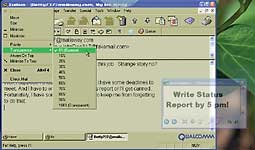
Say you want to place on your screen a reminder message that's transparent, so other application windows remain visible. Or suppose you want to keep a program that you rarely interact with running all the time, but you'd rather have its minimized icon in the system tray (the area of the taskbar by the clock) than in the Quick Launch toolbar. Or maybe you just want to give a sluggish application full access to all of your computing power. These are some of the many functions you'll find as options on almost any Control menu (the icon in the upper-left corner of your application window) when you use the multifaceted Power Menu utility, which is the creation of Thong Nguyen (also known as "Tum"). Even if you need just one or two of these features, check Power Menu out--after all, it's free. The transparency effects work only in Windows 2000 and XP. Click here to download a copy. |